
diados
Extension of the Day

diados

5.0 FREE
  • Screenshot 1

Description

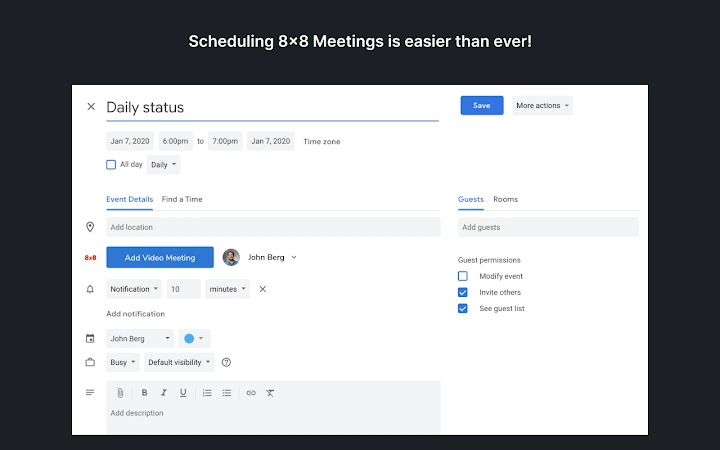
Set up 8x8 Virtual Office Meetings from Google Calendar8x8 Virtual Office Meetings allows you to collaborate with your team members effectively whether they work down the hall or thousands of miles away.With just one click, the Virtual Office Meetings for Google Calendar extension allows you to easily schedule a Virtual Office Meetings and send meeting invites all from within your Google Calendar. You can now see the availability of meeting attendees and pick a time that works for everyone. Email meeting invitations now include all the information your guests need to join, including a web link to join the meeting online. You can also make changes to Virtual Office Meetings directly from your Google Calendar without having to log into 8x8 Virtual Office. Simply open the meeting in your Google Calendar, make the desired changes, and click Update Meeting. An updated invitation is sent to all attendees.An existing 8x8 Virtual Office Pro extension is all you need to use the Virtual Office Meetings for Google Calendar extension. Please contact your 8x8 phone system administrator for help. To find out more about 8x8 Virtual Office Meetings, please use the link below.

Guides & Tutorials for 8x8 Work Meetings Extension for Chrome

How to install 8x8 Work Meetings Extension for Chrome
  1. Click the Preview / Download button above.
  2. Once redirected, accept the terms and click Install.
  3. Wait for the 8x8 Work Meetings Extension for Chrome download to finish on your device.
How to use 8x8 Work Meetings Extension for Chrome

This software is primarily used for its core features described above. Open the app after installation to explore its capabilities.

User Reviews for 8x8 Work Meetings Extension for Chrome 0

    No reviews found

Similar Apps


